Repetitive editing work in one panel
Reels cuts, captions, beat-based cuts and speed ramps, inside Premiere, from a single panel.
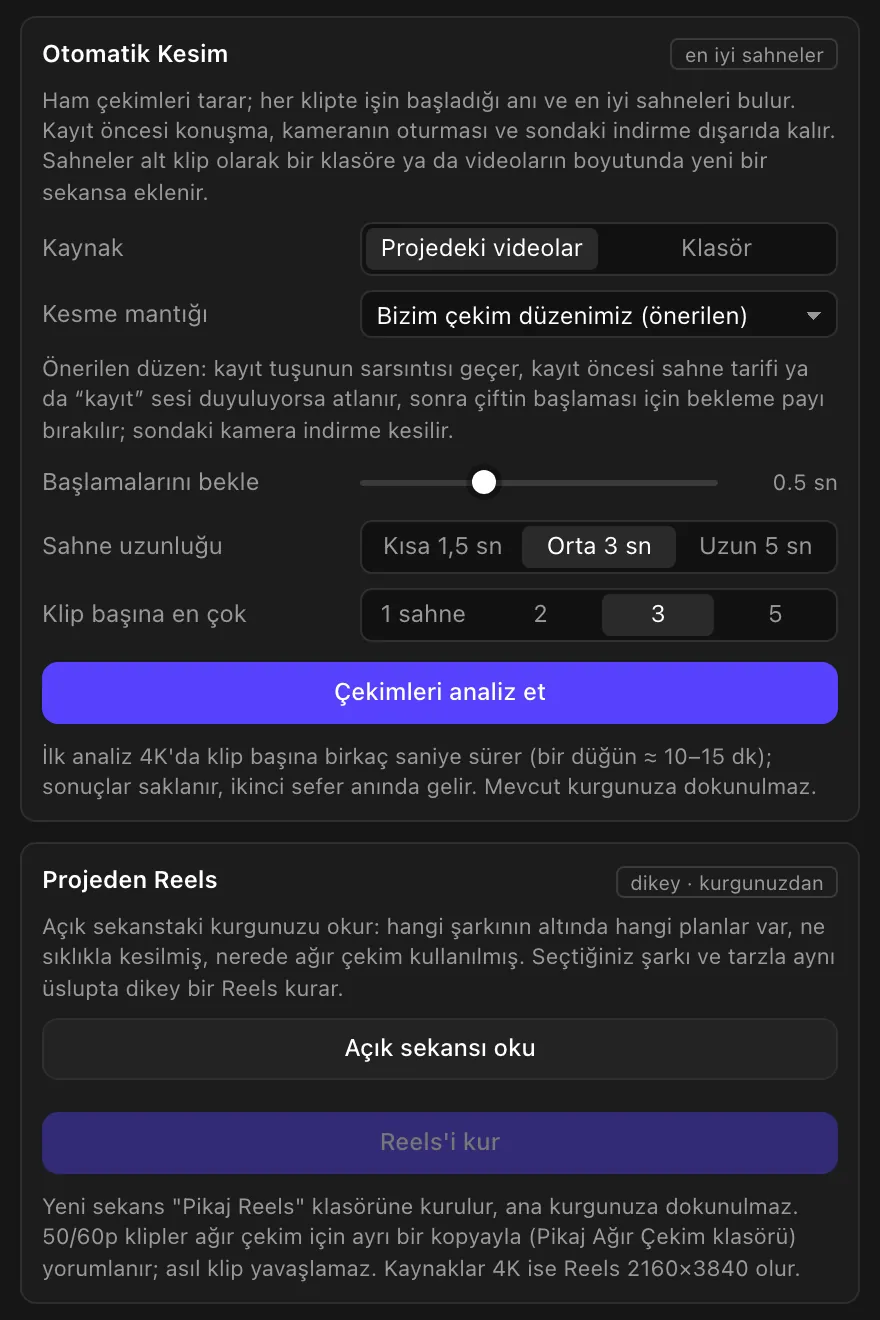
- Auto Reels cut. It reads the edit in your open sequence: which shots sit under which song, how often you cut, where you used slow motion. It then builds a vertical Reels in the same style with the song and style you pick. The new sequence is created in a “Pikaj Reels” folder; your main edit isn't touched. 50/60p clips are interpreted for slow motion with a separate copy, so the original clip isn't slowed down. If your sources are 4K, the Reels is 2160×3840.
- Automatic cut of raw footage. It finds the moment the action starts and the best scenes. Talk before recording, the camera settling and the wrap-up at the end are left out; scenes arrive as subclips or a new sequence.
- Automatic captions. Selected clips are transcribed with word timing. You correct the text first, then add it as Premiere captions or animated captions. The audio doesn't leave your computer: transcription runs on your Mac. Five animated styles (Bold highlight, Clean karaoke, Single word, Elegant serif, Filling color), with position, size and colors in your hands. You can also save the text as SRT. On first use, whisper-cpp (via Homebrew) and a speech model (142–547 MB) are installed once from the panel.
- Beat-based editing. It finds the beats of a song (BPM) and marks them on the timeline; cuts, zoom pulses and effects land on those beats. It also sets one transition or a mix of transitions on all cuts, cuts silences, detects scenes, and builds a story clip from a shoot folder and your own music library.
- Speed ramps. Retime a clip fast → slow → fast. 24 ready speed curves (Fast → Slow → Fast, Fast in → Slow, Slow → Fast out, Slow → Fast → Slow, Sudden brake and Double hit, each in Smooth, Sharp, Elastic and Linear), or draw your own by dragging points. 50/60/120p footage uses real slow-motion frames. The result is placed on top of the clip as ProRes; the original stays underneath.
- Cover and poster titles. 25 title templates (names, date and place, lower third, vows and letter, monogram and 12 poster layouts, 4 of them for vertical covers). You type the names and the date. They are added as Premiere graphics, so you don't wait for a render and you edit the text in the Essential Graphics panel. They come with 21 openly licensed fonts.
- Library. Add the files you use in every project (logo, intro, jingle) once; clicking a tile brings the file into the project, and it isn't added twice. Star your favorite effects to collect them in Favorites.
Your main sequence is never changed by the Reels or automatic cut tools. Old projects are not affected by updates: effects are stored in the project with unchanged names.
92 effects and transitions as native Premiere effects
44 transitions and 48 effects arrive in Premiere's Effects panel, in the “Pikaj Fx Studio” folder. Drag them onto a clip and adjust them with keyframes in Effect Controls; the project opens the same on another machine.
- 44 transitions. Film burn, swish pan, zoom through, glitch, ink, paper tear, and text in/out transitions.
- 48 effects. Glow, halation, anamorphic streak, bokeh, film grain, VHS, 30 ready color looks and log → Rec709.
- 171 ready-made video layers. Film burns, light leaks, lens flares, anamorphic flares, fireworks, bokeh, VHS and TV, hand-drawn shapes, neon, iris wipes, camera viewfinder, dust transitions, film grain textures and more. They align to the middle of the cut and the blend mode is set automatically. Use them in your own projects without limit; they can't be sold or distributed as a separate product.
- 206 sound effects. Whooshes, hits, risers, cinematic transitions and atmospheres, all at the same loudness; drag them onto the timeline. The samples are Pikaj's own synthesis.
- Ready for vertical edits. In a 9:16 sequence the effects work at the right aspect ratio and the vertical versions of the ready-made videos are chosen automatically.
The effects are Pikaj Fx Studio's own layers; there is no render wait. Pikaj doesn't provide music: the story clip uses your own licensed music library, and no copyrighted songs are downloaded.
Requirements and price
- macOS. Apple Silicon and Intel Macs, with a Metal-capable graphics card. Effects run on macOS's Metal.
- Premiere Pro 2022 or later. Tested with Premiere Pro 26.2.
- The Pikaj desktop app (1.0.28 or later) must be open while the plugin runs, and a Pikaj subscription is required: included in Complete Bundle at no extra cost and open during the 15-day free trial (no credit card needed); on its own €4.29 a month or €42.90 a year (VAT included). See the pricing page.
Premiere Pro is a trademark of Adobe. Pikaj Fx Studio is not affiliated with Adobe. The fonts in the plugin are licensed under the SIL Open Font License 1.1.
Frequently asked questions
Is Pikaj Fx Studio free?
The plugin itself isn't free, but you can try it free: it is open during Pikaj's 15-day free trial (no credit card needed), and it is included in the Complete Bundle subscription at no extra cost. You can also buy it on its own: €4.29 a month or €42.90 a year (VAT included).
How do I install it?
In Pikaj's Plugins window (Pikaj 1.0.28 or later), press Install next to Pikaj Fx Studio. On a Mac, the panel, the ready-made videos and sounds, 48 effects and 44 transitions are downloaded and installed. Premiere must be closed during installation, and a Mac asks for an administrator password once on first install.
Where do I find the effects and the panel?
The effects are under Effects ▸ Video Effects and Video Transitions, in the “Pikaj Fx Studio” folder. The panel opens from Window ▸ Extensions ▸ Pikaj Fx Studio.
What do I need for automatic captions?
Transcription runs on your Mac; the audio isn't sent anywhere. On first use, whisper-cpp (via Homebrew) and a speech model (142–547 MB) are installed once from the panel.
Do the Reels and automatic cut tools change my main edit?
No. Reels builds a new sequence in a “Pikaj Reels” folder; the automatic cut adds scenes as subclips or a new sequence. Your existing edit is not touched.
Does it provide music?
No. The story clip uses your own licensed music library; no copyrighted songs are downloaded.
Try it first
Pikaj installs on your computer. Try it free for 15 days; no credit card needed.
How to use Pikaj Fx StudioDownload PikajPricing and subscription termsPikaj Retouching for PhotoshopAll Pikaj products