
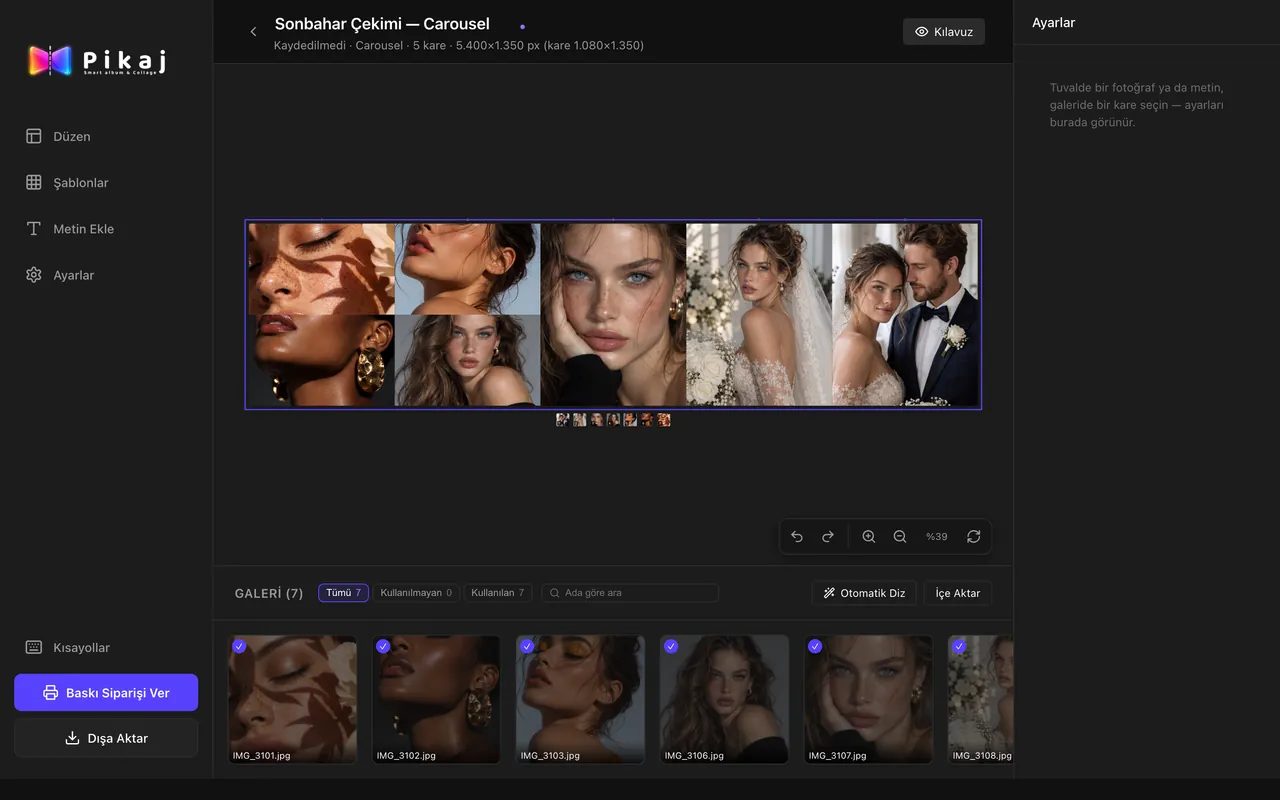
What is collage design in Pikaj?
Collage design means building a single-page design in the Pikaj desktop app: an Instagram post, a story, a YouTube thumbnail, a thank-you card or a collage for print. A carousel is that single page spread across several frames side by side. It uses the same workspace as album design: auto layout, templates, cropping, filters and text.
- Photographers who share after a shoot. You prepare the selection from a wedding or a portrait session as a swipeable post; the frames come out as numbered files.
- People who don't speak print. You choose the platform and the post type and the size comes ready-made. No DPI or trim to deal with.
- Anyone who wants a single printed page. You can also enter the size in centimeters or millimeters; take the file and print it, or hand the order to SharePrint.
Making a collage or carousel in four steps
The full walk-through is in How to make a collage and a carousel.
-
Choose the size
On Home, press Create collage: Carousel, an Instagram post or story, another platform from All sizes, or Custom size.
-
Add the photos
Drag them onto the gallery strip or press Import.
-
Arrange and decorate
Auto layout, a layout or a template; cropping, filters and text.
-
Export
PNG, JPG, WebP or PDF; for a carousel, frame by frame or as one combined image. You can place a print order as well.
What it does
- Ready-made sizes. The most used ones sit at the top of the new collage window: Carousel, Instagram square, portrait and tall post, story. All sizes opens the whole list, including profile, cover, story, Reels, Shorts, thumbnail and Google Play and App Store images for Instagram, Facebook, YouTube, TikTok, LinkedIn and X; you can search by platform name. Custom size takes a width and height in pixels, centimeters or millimeters. The size boxes do the math: type 1080*3 and press Enter and it becomes 3240.
- Carousel on one canvas. Pick the frame size: Instagram portrait (1080×1350), square (1080×1080), story (1080×1920), tall (1080×1440) or LinkedIn post (1200×1500). Two to twenty frames; 2, 3, 4, 5, 6, 7, 10 and 20 are one tap, other numbers are typed. The document opens that many frames side by side as one piece, and a photo can cross a frame boundary, which is how designs that flow when you swipe are made. A carousel is one page: Auto layout rearranges the photos across the frames and keeps the text.
- Instagram guide. The Guide button in the top bar draws Instagram's interface over the design (profile spot, user name, swipe dots) so you see what will be covered. In a carousel it is drawn on every frame, because Instagram shows each frame in its own frame. The guide is on screen only and never goes into the file.
- Layouts, templates and text. Grids by photo count in the Layout panel; Templates has Suitable, Single photo, Stack, Grid, Overlapping and With text. Templates are sorted by the page's ratio, and the ones drawn for another ratio go to the end marked as cropping at this ratio. Add text has ready-made styles (title, subtitle, description, date, quote, names and more) in the fonts on your computer, with color, alignment and tilt.
- Crop and color. Slide the crop, straighten, and adjust exposure, contrast, saturation, temperature, sepia and black & white; filter templates show a preview of your photo. Right-click a photo and open it in Photoshop or Lightroom: when you save in Photoshop, the updated photo comes back onto the canvas with the layout and crop kept.
- Export: separately or combined. For a carousel, Pikaj asks how it should be saved. Separately draws the combined canvas, splits it into equal parts and numbers them (…-01, …-02): that is the form you upload to Instagram. One combined image is for checking and presenting. Formats are PNG (lossless, with transparency), JPG, WebP and PDF. PDF with Separately gives one PDF page per frame, the form LinkedIn document posts ask for. There is a quality setting and an output size (½×, 1×, 2×, 3×), and a DPI label is written into the file. The pre-print check warns here too if a photo's resolution falls short.
- Print order through SharePrint. The Place print order button hands the order to SharePrint, a print company separate from Pikaj: print sizes and prices come from its catalog, and the address and payment are completed on SharePrint's own page in your browser. Pikaj suggests the print size closest to your design's ratio and you choose the quantity; print files are prepared as sRGB JPEG at 95% quality without bleed. Pikaj doesn't hold a SharePrint account key on your behalf, and if a photo on a page is missing or can't be opened, the order isn't prepared and Pikaj says so.
- Your photos stay on your computer. Design and export happen on your computer, and the project is saved as a .pikaj file on your disk. Only if you use Place print order are the print files sent to SharePrint.
How to make a collage and a carouselInstagram carousel maker: sizes and steps
The app itself
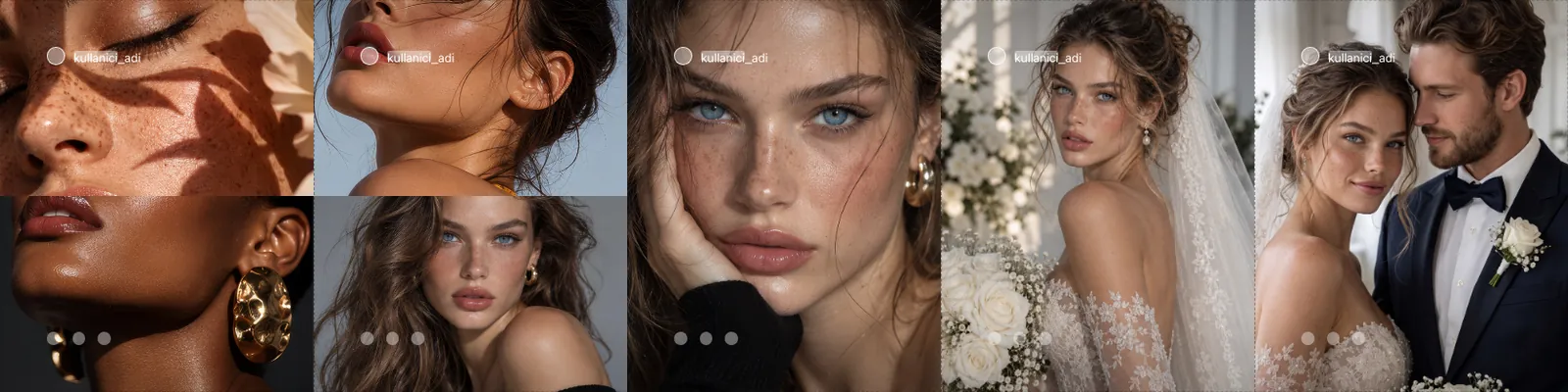
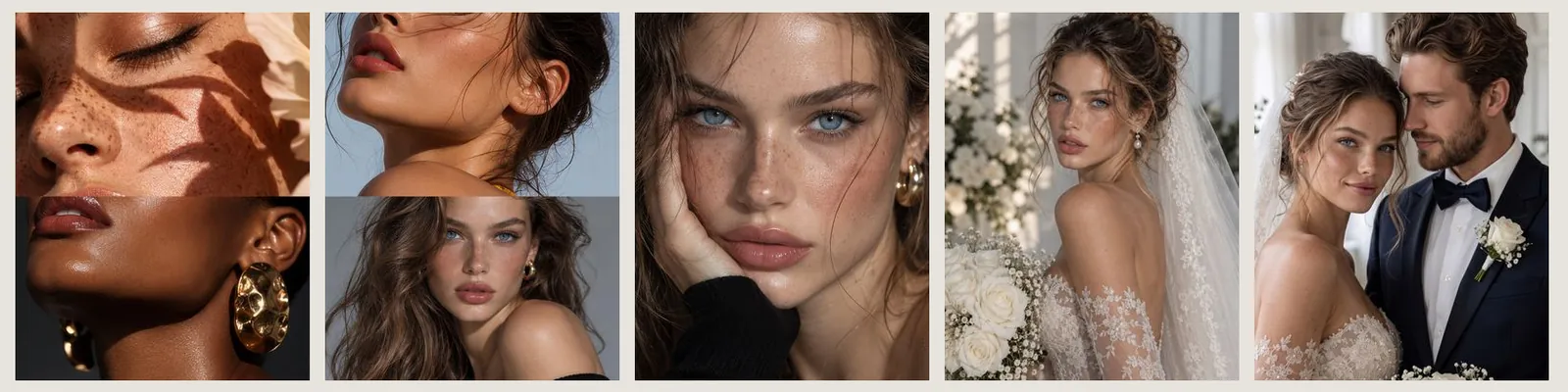
Sample photos. The screenshots show Pikaj's real interface in Turkish; the app also opens in English.
Ready-made sizes and outputs
Values come from the app's own size list. Platforms may change their size recommendations.
- Instagram. Post: square 1080×1080, portrait 1080×1350, tall 1080×1440, landscape 1080×566; story and Reels 1080×1920; multi-post 1080×1350; profile 320×320.
- Facebook. Post 1200×630, cover 1640×624, story and Reels 1080×1920, profile 320×320.
- YouTube. Thumbnail 1280×720, channel banner 2560×1440, Shorts 1080×1920, profile 800×800.
- TikTok. Video and video cover 1080×1920, profile 200×200.
- LinkedIn. Post 1200×627, profile cover 1584×396, profile 400×400. Carousel frame: LinkedIn post 1200×1500.
- X (Twitter). Post image 1600×900, header 1500×500, profile 400×400.
- Also. Google Play and Apple App Store icon and screenshot sizes; custom sizes in pixels, centimeters or millimeters at 72, 150, 254, 300 or 600 DPI.
- Carousel. 2–20 frames; frame size Instagram portrait 1080×1350, square 1080×1080, story 1080×1920, tall 1080×1440, or LinkedIn post 1200×1500.
- Export and files. PNG, JPG, WebP, PDF; carousel separately (numbered names) or as one combined image; ½×–3× output size. The project file is .pikaj, kept on your disk. Platforms: macOS (Apple silicon and Intel) and Windows (Microsoft Store).
Ways to use it
- A shoot's selection as a carousel. Carousel ▸ Instagram portrait ▸ number of frames; drop in the photos you chose and press Auto layout. Export Separately as JPG for files that start at -01.
- A thank-you card or an announcement. An Instagram portrait post, a With text template and the Names or Date style. You can export the same design as PNG or PDF too.
- A LinkedIn document post. Carousel ▸ LinkedIn post (1200×1500); when exporting choose PDF and Separately: every frame is a page.
- A seamless panorama swipe. Spread a wide photo across several frames; it is divided between the frames and flows as one piece when you swipe.
Frequently asked questions
Is Pikaj's collage and carousel maker free?
No, but you can try it free: the whole app, collage design included, is open during Pikaj's 15-day free trial (no credit card needed). After that it is part of the Album + Collage subscription (€14.99 a month or €149 a year, VAT included) and the Complete Bundle; see the pricing page.
How do I make an Instagram carousel in Pikaj?
On Home press Create collage and choose Carousel, then set the frame size and the number of frames. The frames open on one combined canvas; add the photos and press Auto layout, or arrange them with a template. When you export, choose Separately: every frame becomes its own file with a numbered name.
How many frames can a carousel have?
From two to twenty. Pikaj doesn't allow more than 20 because Instagram accepts at most 20 frames in a post.
Can a photo cross the boundary between two frames?
Yes. The frames are combined on one canvas, so a photo can cross a frame boundary; designs that flow when you swipe are made this way. When you export, each frame takes its own part.
How are the exported frames named?
In order: numbers such as -01 and -02 are added to the end of the file name, so the order doesn't get mixed up when you upload to Instagram.
How do I enter a size that isn't on the list?
Choose Custom size and type the width and height; you can switch the unit to pixels, centimeters or millimeters. The size boxes also do the math: type 1080*3 and press Enter and it becomes 3240.
Can I export a PDF carousel for a LinkedIn document post?
Yes. In Export choose PDF and Separately: every frame becomes its own PDF page. If you choose One combined image, the whole design comes out on one wide PDF page.
Can I print a collage?
Yes. Take the file as JPG, PNG or PDF and print it wherever you like, or use Place print order to hand the order to SharePrint. SharePrint is a separate print company; the address and payment are completed on its page.
Are my photos uploaded anywhere?
No. Design and export happen on your computer, and the project is saved as a .pikaj file on your disk. Only if you use Place print order are the print files sent to SharePrint.
Which subscription includes collage design?
The Album + Collage subscription covers collage and album design together, and the Complete Bundle includes both. See Album design software.
Make your first carousel today
Pikaj installs on your computer. Try it free for 15 days; no credit card needed.
The Mac app (1.0.31) opens in English: pick the language on the sign-in screen. The Microsoft Store version gets the English interface with its next Store update.
For Windows and Mac.
Pricing and subscription termsAlbum design softwareAll Pikaj products