Connect once, then just press a button
Pikaj's desktop engine finds the face, the skin and the person mask; the work happens in Photoshop, in your own document.
-
Install Pikaj and the plugin
Install the Pikaj desktop app and sign in. In Pikaj's Plugins window, press Install next to Pikaj Retouching; Creative Cloud installs it.
-
Connect from the panel
Open the panel in Photoshop and press “Connect to Pikaj”. You don't type a code: Pikaj opens, asks you to sign in if needed, and you return to Photoshop.
-
Press a tool
The result arrives as a new layer or group, with its mask. If you don't like it, a single undo is enough.
What's in the panel
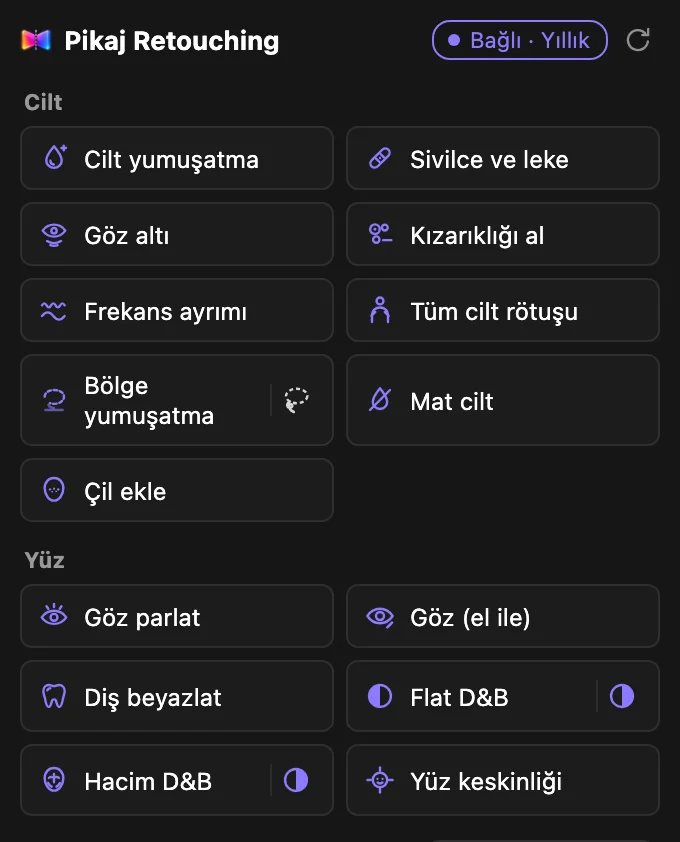
The tools are grouped. Each one adds its result as a layer or group with a mask, so you can lower the opacity or paint the mask.
- Skin. Tone evening, softening, blemish and under-eye repair, redness removal, frequency separation, whole-skin evening across face, neck, arms and body, and matte skin or freckles. Blemishes are repaired from the surrounding skin texture, and in close-ups small red spots on the neck, chest and arms are healed too. Pore texture is largely kept; beards, moustaches and the shape of the nose are not smoothed. Dark moles stay; freckles may fade slightly.
- Eyes, teeth and dodge & burn. Eye brightening in one step, or a manual eye mode with separate masked layers for the eye white, iris, limbal ring, pupil and catchlight. Flat D&B evens small tonal irregularities; Volume D&B adds dimension with the light that is already there. Teeth whitening leaves gums and lips alone; face sharpening works on eyes, brows, lips and beard, not on skin.
- Makeup and shape. Foundation, contour, bronzer, blush, highlighter, eyeshadow, brow fill and lipstick, each in its own blend mode, with colors suggested for the skin tone. Manual mode leaves the mask empty for you to paint; Automatic finds the area. Face slimming and chin tightening come in Light, Medium and Strong.
- Light and effects. The person is selected automatically: brighten the foreground, darken the background, or both, each as a masked curves layer. Glow, star glints, sun rays, a dreamy Orton effect, golden hour and vignette.
- Composition, product and jewelry. Composition guides (golden ratio, rule of thirds, Fibonacci spiral, symmetry, leading lines) open in Photoshop's own Crop guide. Metal gradient separates gold and silver surfaces on jewelry shoots without touching the stones.
- Layers and finishing. Split a person into named layers (hair, face skin, body skin, clothing, brows, eye whites, irises, lips, teeth, background); remove the background on a copy of what you see; remove an object with Content-Aware Fill. Film grain, sharpening, and export as full-size JPEG or Instagram 4:5 and 9:16 sizes with the face centered.
Generative Fill and Generative Expand use Adobe Firefly: they run in Adobe's cloud and use your Adobe account's generative credits. Where Photoshop's own commands run depends on your Photoshop settings.
You stay in control
- On its own layer. Every tool adds its result as a new layer or group with a mask. Lower the opacity, fix the mask with a brush.
- One undo. An action is a single step in Photoshop's history; undoing it restores the document.
- 8-bit and 16-bit. Skin retouching also works on 16-bit documents; untouched pixels keep their exact 16-bit values.
- Your photos stay on your computer. The plugin passes the photo only to the Pikaj app on your computer, and Pikaj does not send it to a server.
Requirements and price
- Photoshop 2024 (25.0) or later.
- The Pikaj desktop app must be open while you retouch; if it is closed, the panel shows an “Open Pikaj” button. The panel follows Photoshop's interface language: English unless Photoshop runs in Turkish.
- Price. Included in the Complete Bundle subscription at no extra cost, and open during Pikaj's 15-day free trial (no credit card needed). On its own: €4.29 a month or €42.90 a year (VAT included). See the pricing page.
Photoshop is a trademark of Adobe. Pikaj Retouching is not affiliated with Adobe.
Frequently asked questions
Is Pikaj Retouching free?
The plugin itself isn't free, but you can try it free: it is open during Pikaj's 15-day free trial (no credit card needed), and it is included in the Complete Bundle subscription at no extra cost. You can also buy it on its own: €4.29 a month or €42.90 a year (VAT included).
How do I install the Photoshop plugin?
In Pikaj's Plugins window (Home ▸ Adobe plugins, or Help ▸ Plugins), press Install next to Pikaj Retouching. The installation package that comes with Pikaj is installed by Creative Cloud, which asks for your approval. Restart Photoshop when it finishes.
Which Photoshop versions does it work with?
Photoshop 2024 (25.0) and later.
Does Pikaj have to be open?
Yes. Pikaj's desktop app finds the face, the skin and the person mask. If Pikaj is closed, the panel shows an “Open Pikaj” button.
Are my photos sent anywhere?
Not to Pikaj: the plugin passes the photo only to the Pikaj app on your computer, and Pikaj does not send it to a server. Generative Fill and Generative Expand use Adobe Firefly and run in Adobe's cloud; where Photoshop's own commands run depends on your Photoshop settings.
Try it first
Pikaj installs on your computer. Try it free for 15 days; no credit card needed.
How to use Pikaj RetouchingDownload PikajPricing and subscription termsPikaj Fx Studio for Premiere ProAll Pikaj products